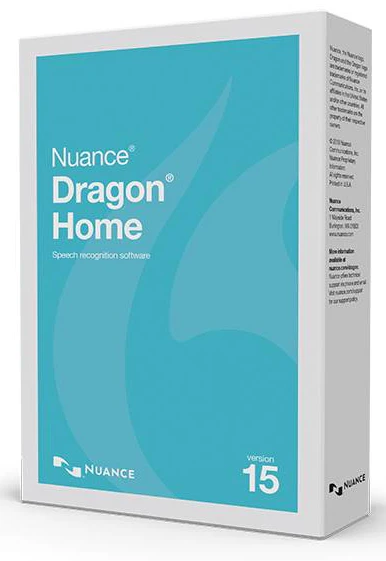
Dragon Home 15 (Download)
From students to everyday multi‑taskers, there’s no better way to get more done on your PC simply by speaking than with Dragon Home version 15, the most intelligent speech recognition solution for home use. Designed using Nuance Deep Learning technology, Dragon quickly transcribes words into text 3x faster than typing with up to 99% recognition accuracy.
Plus, Dragon Home now includes 12 months access to the Dragon Anywhere Mobile app at no additional cost, meaning you can use your voice to dictate homework assignments, send email, surf the web and more—at home or on the go.
Dragon Home 15 is the most intelligent speech recognition for home use, with numerous features, including:
- Featuring Nuance Deep Learning Technology: With a next-generation speech engine leveraging Deep Learning technology, Dragon adapts to your voice or environmental variations—even while dictating.
- Dictate at the Speed of Thought: Dragon intelligently transcribes your spoken words into text 3x faster than typing with up to 99% recognition accuracy. And with a streamlined user interface and no training required, getting started is as easy as launch and dictate!
- 12 Months Access to the Dragon Anywhere App: The included 12 months access to Dragon Anywhere lets you create and edit documents of any length by voice directly on your iOS or Android device for greater productivity wherever life takes you.
- Use with Popular Windows® PCs and Tablets: Dragon works with today’s popular touchscreen PCs and tablets, so you can enjoy the versatility of interacting with your favorite applications - in the classroom or at school.
Dictate Homework Assignments
Transform your ideas into text at the speed of thought. Simply speak and watch your words appear on the screen 3x faster than typing by hand, and with up to 99% recognition accuracy. Dictate homework assignments, write a blog, complete your to-do lists with Full Text Control in Microsoft Word®; send email in Microsoft Outlook® or Gmail™. Don’t let typing, touch screen PCs, spelling or the fear of the blank page slow you down. You talk, Dragon types.
Search, Surf, and Browse the Web by Voice
Use your voice to search the Web using Explorer®, Firefox® or Chrome™. Search for technical specs, information, homework addendums and more. And with Dragon Voice Shortcuts™, you can even collapse common multi-step tasks into direct voice commands, no matter which applications are currently active. For example, say "Search Google for 87 divided by 12" and Dragon makes it happen.
Keep Up with Your Index & Calendar
Email friends and family by dictating, editing and sending messages with Microsoft Outlook, or with Gmail—the most popular web-based email application. Manage kids’ activities, social engagements and other appointments in your calendar with voice commands like "Create a new all-day event."
System Requirements:
- RAM: Minimum of 4GB.
- CPU: Intel® dual core or equivalent AMD processor. Faster processors yield faster performance.
- Free hard disk space: 8GB.
- Supporting operating systems: Microsoft Windows 7, 8.1, and 10 (32-bit and 64-bit).
- Web browsers: Internet Explorer 11 or higher, or current version of Chrome or Firefox.
- Sound card: Sound card that supports 16-bit recording.
Internet connection (activation): An internet connection is required for automatic product activation (a quick, anonymous process) and to access online help.
Original: $179.95
-70%$179.95
$53.98Product Information
Product Information
Shipping & Returns
Shipping & Returns
Description
From students to everyday multi‑taskers, there’s no better way to get more done on your PC simply by speaking than with Dragon Home version 15, the most intelligent speech recognition solution for home use. Designed using Nuance Deep Learning technology, Dragon quickly transcribes words into text 3x faster than typing with up to 99% recognition accuracy.
Plus, Dragon Home now includes 12 months access to the Dragon Anywhere Mobile app at no additional cost, meaning you can use your voice to dictate homework assignments, send email, surf the web and more—at home or on the go.
Dragon Home 15 is the most intelligent speech recognition for home use, with numerous features, including:
- Featuring Nuance Deep Learning Technology: With a next-generation speech engine leveraging Deep Learning technology, Dragon adapts to your voice or environmental variations—even while dictating.
- Dictate at the Speed of Thought: Dragon intelligently transcribes your spoken words into text 3x faster than typing with up to 99% recognition accuracy. And with a streamlined user interface and no training required, getting started is as easy as launch and dictate!
- 12 Months Access to the Dragon Anywhere App: The included 12 months access to Dragon Anywhere lets you create and edit documents of any length by voice directly on your iOS or Android device for greater productivity wherever life takes you.
- Use with Popular Windows® PCs and Tablets: Dragon works with today’s popular touchscreen PCs and tablets, so you can enjoy the versatility of interacting with your favorite applications - in the classroom or at school.
Dictate Homework Assignments
Transform your ideas into text at the speed of thought. Simply speak and watch your words appear on the screen 3x faster than typing by hand, and with up to 99% recognition accuracy. Dictate homework assignments, write a blog, complete your to-do lists with Full Text Control in Microsoft Word®; send email in Microsoft Outlook® or Gmail™. Don’t let typing, touch screen PCs, spelling or the fear of the blank page slow you down. You talk, Dragon types.
Search, Surf, and Browse the Web by Voice
Use your voice to search the Web using Explorer®, Firefox® or Chrome™. Search for technical specs, information, homework addendums and more. And with Dragon Voice Shortcuts™, you can even collapse common multi-step tasks into direct voice commands, no matter which applications are currently active. For example, say "Search Google for 87 divided by 12" and Dragon makes it happen.
Keep Up with Your Index & Calendar
Email friends and family by dictating, editing and sending messages with Microsoft Outlook, or with Gmail—the most popular web-based email application. Manage kids’ activities, social engagements and other appointments in your calendar with voice commands like "Create a new all-day event."
System Requirements:
- RAM: Minimum of 4GB.
- CPU: Intel® dual core or equivalent AMD processor. Faster processors yield faster performance.
- Free hard disk space: 8GB.
- Supporting operating systems: Microsoft Windows 7, 8.1, and 10 (32-bit and 64-bit).
- Web browsers: Internet Explorer 11 or higher, or current version of Chrome or Firefox.
- Sound card: Sound card that supports 16-bit recording.
Internet connection (activation): An internet connection is required for automatic product activation (a quick, anonymous process) and to access online help.